Hey.! Friends, Make money while surfing!!
1) If you don’t have an account already, register on PayPal http://www.paypal.com/. Its free.
2) Then register at, http://bux.to (also free)
3) Log in Bux.to, and click “Surf Ads”. Click the listed advertisements and wait until the 30-second counter finishes before closing the window. Click one Advertisement AT A TIME. It won’t work if you just open all ads at once. You can earn alot of money on this site by clicking ads.
4) When you have earned $10+ dollars, transfer them to your PayPal account by clicking “Cashout” in your “My Stats” window.
5) Don’t forget to come back everyday and click more ads to get more money & tell your friends about this offer!!
Sunday, January 20, 2008

Windows Media Player 11 Aero Black skin


How to install :
Open replacer, drag the ORIGINAL wmploc.dll from C:\windows\system32 into the replacer window. Press Enter.Then drag the modified wmploc from the dll folder in the window. Press enter, then Y, and enter again. Then quit.

Download :

Pass: www.dl4all.com

2 Vista Max Trans Themes

Orange theme for windows xp in vista style


pass: www.dl4all.com

Aero Diamond Theme for Windows Vista


Here is the Aero Diamond Theme for windows vista.
Sit back and enjoy!!!

Please use TakeControl to take ownership of the following files and then back up the original before messing with them.
The following files to replace are located in \windows\system32
Shell32.dll
browseui.dll
oobefldr.dll

Copy the Theme Style of your choice into \Windows\Resources\Themes\

*NOTE: Please do not copy both there. Simply one.
You will require Sidebar Styler for the Hornish Theme.

Download :

pass: www.dl4all.com

Microsoft Sysinternals Process Explorer v11.04


Ever wondered which program has a particular file or directory open? Now you can find out. Process Explorer shows you information about which handles and DLLs processes have opened or loaded.

What's new in Version 11.04:
~ New treelist control for better UI responsiveness
~ Asynchronous thread symbol resolution on threads tab of process properties
~ More flags on groups in security tab and SID display
~ Thread IDs on threads tab
~ On-line search uses default web browser and search engine
~ Vista ASLR column for processes and DLLs
~ Vista Process and thread I/O and memory priorities in process and thread properties
~ Vista Process and thread I/O and memory columns
~ PROCESS_QUERY_LIMITED_INFORMATION support on process permissions on Vista
~ Run as limited user runs with low IL on Vista
~ Reports information for all object types on Vista
~ Show details for all processes elevation menu item on Vista
~ Supports replacement of task manager on Vista
~ /e to launch elevated
~ /s switch to select a process at startup
~ Compiled w/ASLR, DEP
~ Faster startup
~ Miscellaneous bug fixes and minor improvements

Download :

pass: www.dl4all.com

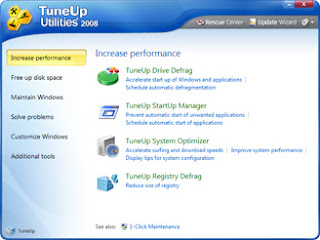
TuneUp Utilities 2008 v7.0.7992


10 fundamental reasons for using TuneUp Utilities 2008
* Powerful hard drive defragmentation
* Optimum start-up, Internet, and Windows acceleration
* Quick and extensive clean-up for hard drives
* Effective elimination of junk data
* Fully-automatic clean-up and improvement of your PC
* Extensive clean-up of the registry
* Effective help in solving standard Windows problems
* Secure data recovery and data elimination
* Simple custom Windows configuration
* Individual Windows styling

Download :

pass: www.dl4all.com